


Last Updated: November 2, 2026
Quick Summary
Security pricing models are the ways managed security providers charge for monitoring, detection and response, usually by user, by device, by service tier, through bundled IT contracts, or as flat or usage-based fees. Each model shifts cost predictability and scope, so compare quotes on the same monitoring hours, response times and exclusions.
- Per-user pricing suits stable headcount where each person uses one primary device.
- Per-device pricing fits shared workstations, kiosks and server-heavy environments.
- Usage-based billing can spike during an incident, so ask for a monthly cap or retainer.
- Confirm onboarding, overage rates and exclusions before comparing any two quotes.
- Request the same monitoring hours, response times and included tools from every provider.
Table of Contents
- How Managed Security Service Pricing Works
- Per-User Security Pricing: When It Fits and When It Does Not
- Per-Device Managed Security Pricing for Endpoint-Heavy Environments
- Tiered, Bundled and Flat-Fee Models Compared
- Usage-Based and Pay-as-You-Go Pricing: Where It Breaks Down
- Managed Security Services Cost Factors That Move the Price
- MSSP Service Inclusions and Exclusions to Check Before Signing
- Worked Comparison: Total Cost for 15, 50 and 150 Users
- Choosing a Pricing Model and Requesting a Like-for-Like Quote
- Frequently Asked Questions
How Managed Security Service Pricing Works
Managed security service pricing is the way a provider charges for monitoring, detection, and response over a set period. Most quotes are built on one of a few units: users, devices, service tier, or a flat fee, and understanding how each of these shapes the total is central to comparing security pricing models. Knowing which unit a provider uses is the fastest way to compare offers that look different on paper.
Published ranges are useful as reference points, but they are not quotes. A guide from MSSP Providers lists typical per-user pricing of $30 to $150 per month and per-device pricing of $15 to $80 per month, while Meriplex gives a directional per-user range of $50 to $200 or more depending on scope and risk. Those ranges show how wide the market is, and why scope matters more than the headline number.
Before comparing any two quotes, confirm three things: what is covered, what the unit of charge is, and what sits outside the monthly fee.
Per-User Security Pricing: When It Fits and When It Does Not
Per-user pricing is one of the most common security pricing models: it charges a fixed monthly amount for each person in the organization, usually covering that person’s devices and accounts. It is easy to budget because the cost scales with headcount rather than hardware.
It fits well when staff typically use one primary computer and perhaps a phone, and when headcount is stable. For a team of fifteen, a per-user quote is simple to explain to a finance lead.
It does not fit well when employees carry several devices, when shared workstations are common, or when a small group runs many servers. In those cases, a per-user price can understate true coverage, and the gap usually appears after signing. Ask whether service accounts, shared mailboxes, and kiosks are counted.
Per-Device Managed Security Pricing for Endpoint-Heavy Environments
Per-device pricing charges by endpoint, such as laptops, desktops, and servers. Huntress describes basic tiers at roughly $8 to $12 per device per month, with premium tiers that add threat hunting and incident response reaching $20 to $30 per device. The spread shows that the device count alone does not define the price; the service level does.
This model suits environments where people share machines, run kiosks, or operate a fleet of servers, because each endpoint is priced directly. It can also be cheaper for organizations with more devices than people.
The risk is undercounting. A device list that misses laptops returned to a drawer, or newly added machines, will raise the bill mid-contract. Request a written inventory method and a rule for adding devices.
Tiered, Bundled and Flat-Fee Models Compared
Tiered pricing offers named packages, such as basic, standard, and advanced, each with a defined feature set. Dataprise, for example, lists IT Foundation from $102 per user per month, IT Fortify from $158, and IT Comply from $210. Tiers make comparison easier, but only if you check exactly what each level includes.
Bundled pricing folds security into a broader managed IT contract, covering help desk, patching, backup, and monitoring together. It can simplify vendor management and reduce overlap, though it may include services you do not need.
Flat-fee pricing sets one monthly charge regardless of headcount or device count within agreed limits. It delivers predictable budgeting, yet most flat fees carry caps, so a growing company may hit a threshold and face a step-up.
| Model | Cost driver | Predictability | Main risk |
|---|---|---|---|
| Tiered | Package level and user count | High | Paying for features you do not use |
| Bundled | Overall managed IT scope | High | Broader contract than needed |
| Flat fee | Fixed, within limits | Very high | Step-ups when limits are exceeded |
Usage-Based and Pay-as-You-Go Pricing: Where It Breaks Down
Usage-based pricing bills for consumption, such as events processed, incidents handled, or hours of response time. Pay-as-you-go follows the same logic, charging only for what is used.
It can work for organizations with low, steady risk and minimal incident activity. Where it breaks down is during an attack. Incident response is exactly when usage spikes, and an invoice can jump far beyond budget at the moment a company can least absorb it.
For SMBs that need predictable spend, a usage model usually calls for a monthly cap or a retainer. Without one, the cost is hard to forecast and harder to defend to leadership.
Managed Security Services Cost Factors That Move the Price
Several factors shift a quote regardless of pricing unit. The most common include the number of users and devices, the depth of monitoring (business hours versus around the clock), whether threat hunting and incident response are included, and the compliance obligations that drive logging and reporting requirements.
Onboarding and setup fees are often separate from the monthly rate. Migration of existing tools, policy configuration, and cleanup of an older environment can take substantial effort, so ask whether implementation is billed one time or spread out.
Internal costs also belong in the comparison. Staff time spent on vendor management, alert triage, and reporting is a real expense even when no invoice shows it.
MSSP Service Inclusions and Exclusions to Check Before Signing
A low monthly figure means little until you know its boundaries and the contract terms wrapped around it. Most buyers focus on the scope of monitoring and miss the billing mechanics that decide what the engagement actually costs over three years. The checklist below covers both, because a generous scope with punitive contract terms is worse than a modest scope with clean terms.
Scope questions, what is in and what is out:
- What is monitored: endpoints, servers, Microsoft 365 accounts, cloud workloads, network devices, email. Get each named explicitly.
- What response actions the provider may take without approval, and which require a change ticket.
- Response-time commitments by severity level, written as measurable targets rather than “promptly.”
- Reporting cadence and format: monthly summary, quarterly review, on-demand during incidents.
- Common exclusions to confirm in writing: incident remediation labor, ransomware recovery and data restoration, cloud workloads outside the agreed environment, third-party tools the provider does not manage, and after-hours response beyond the included allowance.
Contract and billing terms that change total cost:
- Minimum commitment: the shortest term offered, and whether the per-unit rate is locked for that term or steps up at renewal.
- Renewal terms: auto-renewal notice windows, and what happens to the rate at each renewal.
- Price escalators: the maximum annual increase, stated as a percentage cap rather than “subject to change.”
- Overage charges: how additional users, devices, or incidents are billed, and whether overages are billed at the contract rate or a premium rate.
- Cancellation and early-termination fees: what you owe if you leave before the term ends, and whether unused onboarding is clawed back.
- Service-level agreements: the remedies if response times or uptime targets are missed, service credits, termination rights, or nothing.
- True-up and inventory rules: how new hires, returned laptops, and decommissioned servers are counted, and when the count is reconciled.
Watch out: a contract that quotes a per-device rate but reconciles device counts only at annual true-up can produce a large catch-up invoice mid-year if your fleet grew faster than expected. Ask for the reconciliation cadence and the rule for adding devices in writing.
A practical quote-comparison checklist:
- Same monitoring hours and response times across every quote.
- Same included tools and same pass-through licenses.
- Onboarding shown as a separate line, not buried in the monthly rate.
- Overage and incident-response rates stated explicitly.
- Contract length, renewal notice, escalator cap, and cancellation terms side by side.
- SLA remedies written down, not promised verbally.
A quote that cannot be compared line by line on these six points is a signal to ask harder questions before signing. For a clearer picture of how a managed engagement is structured for a team your size, see how managed IT support is scoped for a fifteen-person office. Teams pricing endpoint coverage can also review practical steps for implementing endpoint protection, and a managed EDR product sold per device shows how device-based licensing works in practice.
Worked Comparison: Total Cost for 15, 50 and 150 Users
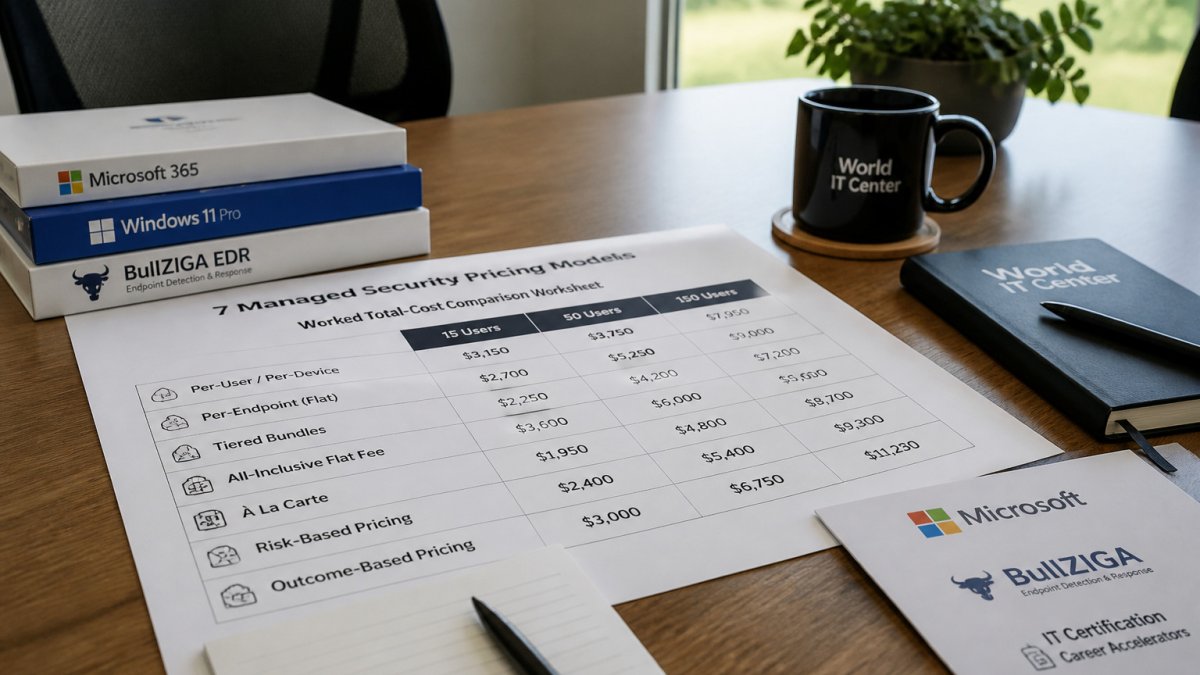
Headline monthly rates are the least useful number in a managed security quote. What actually decides budget is the total cost of ownership across the contract term, built on stated assumptions so two offers can be compared line by line. The example below uses illustrative figures drawn from published market ranges, not a provider price, to show how the models diverge as headcount grows and where hidden costs appear.
Shared assumptions for all three scenarios:
- Each user has one primary laptop; servers are counted separately.
- Monitoring is 24/7 with defined response times.
- Endpoint protection licensing is included in the managed fee.
- Onboarding is billed one time and amortized across a 36-month term for comparison.
- Internal staff time for vendor management and alert triage is valued at a loaded hourly rate and shown as a separate line, not folded into the provider fee.
| Cost line | 15 users | 50 users | 150 users |
|---|---|---|---|
| Per-user managed security (illustrative $100/user/month) | $1,500/month | $5,000/month | $15,000/month |
| Per-device managed EDR (illustrative $15/device/month, 1 laptop each) | $225/month | $750/month | $2,250/month |
| One-time onboarding (illustrative, amortized over 36 months) | shown separately | shown separately | shown separately |
| Internal staff time for triage and vendor management | shown separately | shown separately | shown separately |
| Incident-response overage (if billed hourly) | variable | variable | variable |
The per-user and per-device lines are not substitutes, they cover different scopes. A per-device EDR fee typically covers endpoint detection and response on each machine, while a per-user managed security fee usually bundles monitoring, alert triage, reporting, and account coverage for that person. Comparing the two as if they were the same service is the most common mistake buyers make.
Where the models diverge as you grow:
- At 15 users, per-user pricing is simple to budget and easy to explain to a finance lead, but the per-device line looks dramatically cheaper only because it covers a narrower scope. Add monitoring, reporting, and account coverage to the per-device figure before comparing.
- At 50 users, per-user totals scale linearly with headcount. A tiered or bundled quote may land lower per seat because it spreads fixed monitoring costs across more people, but check whether the tier includes the response obligations you need.
- At 150 users, per-user pricing can become the largest single line in the IT budget. At this size, a flat-fee or tiered structure with agreed caps often produces more predictable spend, provided the cap is set above realistic growth.
Costs that rarely appear in the headline rate:
- Onboarding and migration: policy configuration, cleanup of an older environment, and tool integration are often billed one time. Ask whether implementation is a separate line or spread across the term.
- Tool licensing: some providers resell endpoint protection, backup, or email security at a markup; others require you to keep existing licenses. Confirm which tools are included and which are pass-through.
- Internal staff time: even a fully managed engagement leaves someone responsible for vendor management, alert review, and reporting. That time is a real cost even when no invoice shows it.
- Incident-response overages: if response labor is billed hourly beyond an included allowance, a single serious incident can exceed the annual managed fee.
Run the same three-column test for your own headcount, device count, and required service level. State every assumption in writing, then add onboarding, tool licensing, internal time, and a realistic incident allowance to each line before comparing totals. A quote that cannot be rebuilt on this worksheet is a quote that is hiding scope.
Choosing a Pricing Model and Requesting a Like-for-Like Quote
Start by matching the pricing unit to how your organization actually uses technology. Per-user fits stable headcount with one device each. Per-device fits shared or server-heavy environments. Flat fees suit teams that value predictability and can stay within agreed limits.
Then request quotes on the same basis. Ask every provider for the same monitoring hours, response times, included tools, exclusions, onboarding cost, and contract terms. A quote that cannot be compared line by line is a signal to ask harder questions.
If you want a clearer picture of how a managed engagement is structured for a team your size, see how managed IT support is scoped for a fifteen-person office. For a side-by-side look at two local providers before you request quotes, compare Sourcepass and Managed Solution. Teams pricing endpoint coverage can also review practical steps for implementing endpoint protection, and a managed EDR product sold per device shows how device-based licensing works in practice.
Request written scope, confirm the unit of charge, and calculate the three-year total before deciding. The cheapest headline figure is rarely the lowest real cost.
Frequently Asked Questions
What are the main pricing models for managed security services?
Managed security providers most often price by user, by device or endpoint, through tiered or bundled packages, or with a flat monthly fee. Some add usage-based charges for items such as log volume or incident response hours. Each model counts something different, so two quotes with similar headline numbers can cost very different amounts once scope is aligned. Compare quotes against the same user count, device count, service level and exclusions before deciding which model is cheaper for your organization.
Is per-user or per-device pricing cheaper for a small business?
It depends on how many devices each employee uses. Per-user pricing tends to suit offices where each person has one primary machine. Per-device pricing can work better when staff share workstations or when a company runs many servers, kiosks or unattended endpoints. Count your users and devices, then price both ways using the same service tier. Published guides show per-user ranges and per-device ranges that differ widely by scope, so use them only as a starting reference and confirm with a written quote.
What is usually excluded from a managed security service quote?
Common exclusions include incident response beyond a set number of hours, remediation of systems that were already compromised before onboarding, hardware replacement, third-party software licensing, custom compliance reporting, and after-hours response unless specified. Onboarding or setup fees may be listed separately. Ask each provider to state in writing what is covered, what is billed as an extra, and how changes in user or device count are priced during the contract term.
How should I compare MSSP proposals fairly?
Normalize every proposal to the same user count, device count, contract length, service tier and response commitments. Then add the one-time setup costs, the expected cost of extra work, and the internal time your staff will still spend on vendor coordination. Check billing terms, minimum commitments, and how the price adjusts if your headcount grows. A lower monthly fee can cost more over a three-year contract once exclusions and add-ons are included.
